

Wordle Solver
Five-letter guessing games reward clear thinking about clues. This free helper takes the guesses you’ve made and the colours you got back, then shows which words are still possible and which guess would tell you the most next.
Opens Unscramble Words 4U, our free word-puzzle site, in a new tab. Free, with no sign-up.
What it does
You enter each guess and copy across its tile colours: grey for a letter that’s absent, yellow for one that’s in the word but somewhere else, and green when the letter sits in its correct spot. The tool filters its word list to the candidates that agree with every row, listing everyday words first.
It also ranks possible next guesses. For each option it imagines playing that word against all remaining candidates and works out how many would typically be left afterwards – the smaller that average, the more useful the guess. Doubled letters are scored the way the game scores them. It doesn’t know any daily answer; it just reasons from your clues, which makes it a good way to teach elimination and probability. Your guesses stay on your device.
How to use it
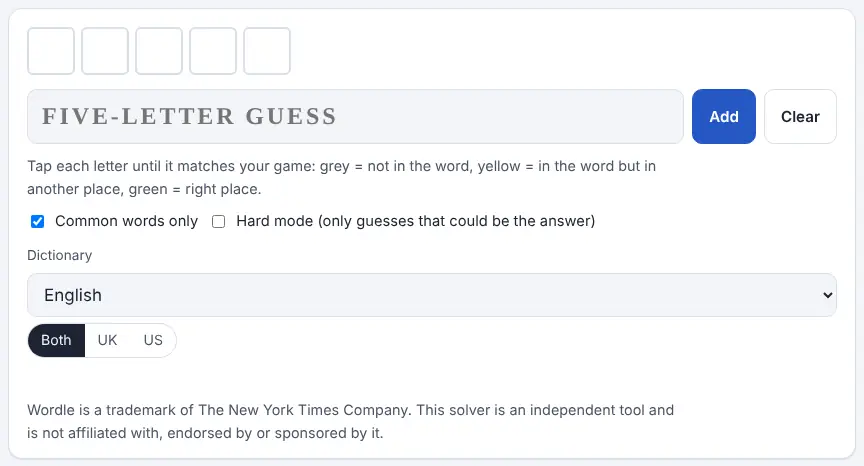
- Type a five-letter guess and press Add. A row of grey tiles appears.
- Tap each tile to match your game: one tap for yellow, a second for green, a third to return to grey.
- Check the list of possible answers, which updates instantly, and the suggested next guesses with their ‘average left’ figure – lower is better.
- Add more guesses the same way. You can enter up to eight rows, remove any row using its small cross, or wipe everything with Clear.
- Use the options: Common words only (on by default), Hard mode to limit suggestions to words that obey all your clues, and the Dictionary for UK, US or Both spellings or another language.
More tips
- When only a couple of letters are unknown but many words fit, a word that checks several of those letters together can beat trying candidates one by one.
- Untick Common words only if you’re playing a version with a bigger word list or the final word is an uncommon one.
Ideas for the classroom and home learning
- KS2 (7–11)Play one class game on the board each morning. After each guess, pupils say what the colours prove before you check the solver’s list together.
- KS3 (11–14)Use the ‘average words left’ score in a maths lesson on probability and information: why does a guess that breaks the candidates into lots of little groups help most?
- KS3–KS4 (11–16)Have students write a short explanation of their strategy for a game, using the solver afterwards to see whether a better guess was available at each step.
- EAL learnersFive-letter words are short enough to build confidence. Pairs play a round, then look up the meaning of every candidate the solver still lists.
Learning a language? Take the challenge
Try it in the language you’re learning. Change the Dictionary to one of the other word lists – the word site’s games support 21 languages, and its pages are translated into 15 – and play a five-letter guessing game in that language, using the solver to check which words your clues still allow.
Questions
How do I mark yellow and green letters?
Add the guess, then tap each tile: once for yellow, twice for green, a third time back to grey.
Does it give away today’s answer?
No. It has no access to any daily answer. It only filters its own open word list using the colours you type, which means any puzzle works, past or present.
What does hard mode do here?
It limits the suggested guesses to words that use everything your clues have revealed so far, matching the rule of the game’s own hard mode.
Opens Unscramble Words 4U, our free word-puzzle site, in a new tab. Free, with no sign-up.
The Wordle name is owned by The New York Times Company. Classfern and Unscramble Words 4U are independent and not affiliated with or endorsed by it.