

School Report Writer
Track progress all year, see at a glance who might need a check-in, and let the tool write the statistics and subject comments for every report. You write only the personal comment. Pupil data never leaves your device.
Try the free demoSee what's in Classfern ProOpen the report writer
The School Report Writer is part of Classfern Pro, which opens soon. See what's included and join the waiting list, or log in if you are a member.
Report season without the late nights
Teachers spend evenings and weekends on reports every year. Most of a report is the same work done thirty times: copying marks into a table, working out progress, finding fresh words for "secure in maths". The School Report Writer does that part for you from the marks, attendance and notes you keep through the year, so your time goes on the bit only you can write.
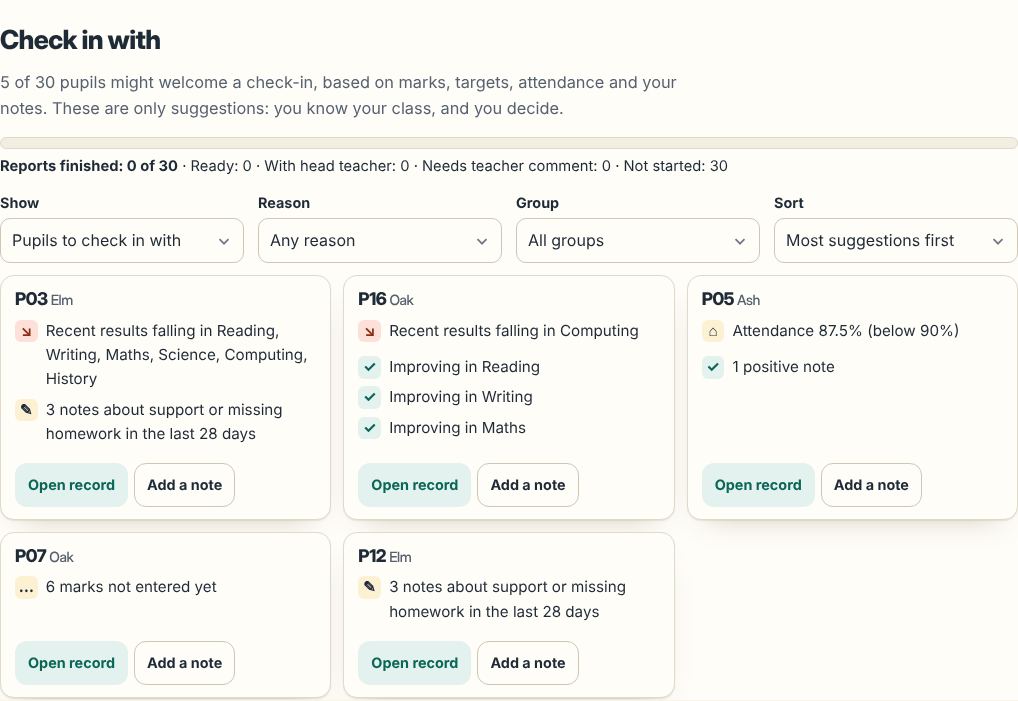
- At a glance: who to check in withFlags pupils below target, with falling results, low attendance, missing marks or a run of "needs support" notes. Every reason is written out. You decide.
- Quick daily notesTap pupils, tap a tag such as "great effort" or "homework missing", save. Fast on a phone. Search and filter later.
- Gradebook for the whole yearMarks and percentages, WTS / EXS / GDS, GCSE 9–1 working-at and target grades, effort 1–4, or your own scale. Attendance and targets too.
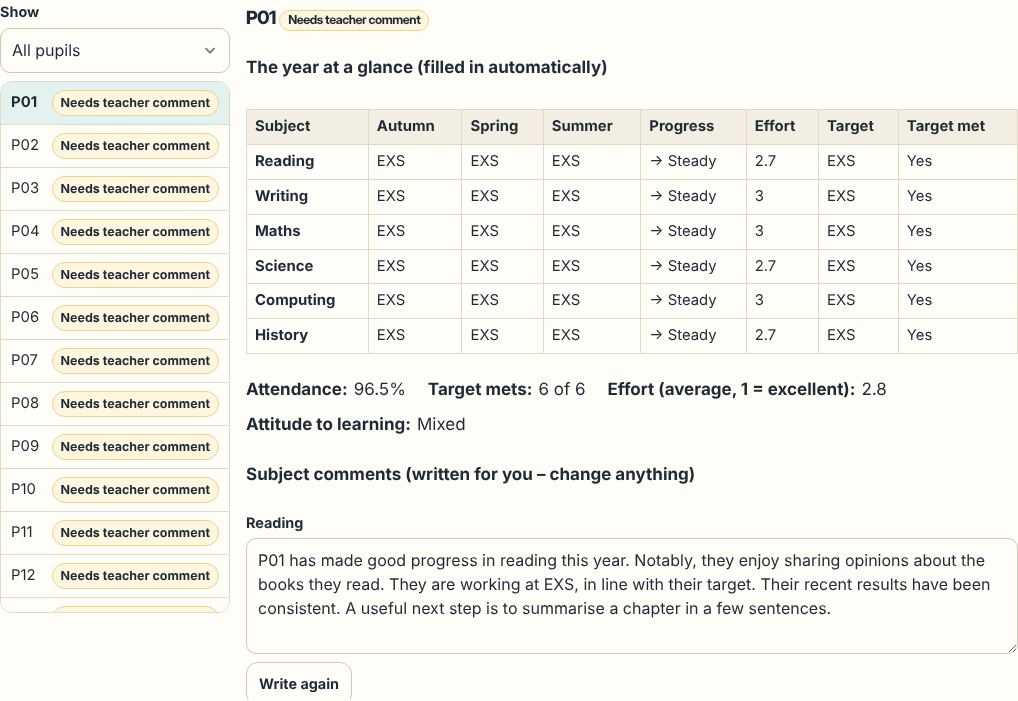
- The year's statistics, filled inAttainment per subject per term, progress since the start of the year, attendance, effort, targets met and curriculum statements achieved.
- Comments written for youEvery subject comment is written from the marks, in full sentences, with they / he / she, a warm, formal or concise tone and short to long lengths. No two pupils get the same text.
- Your personal comment, with promptsThe only part you write. Your notes on that pupil for the year sit beside the box to jog your memory.
- Head teacher review without a serverAn encrypted review pack goes by school email; they add comments, approve or ask for changes, and send a file back that slots straight in.
- Print, PDF and WordOne pupil per page, school name and logo, signature lines. Word files are made in your browser.
Write every report from your marks with Classfern Pro. What's in Pro Join the waiting list
Try the free demo
A sample class of 12 made-up pupils: see who the tool suggests checking in with, a finished report, and the head teacher review step. Nothing you do in the demo is saved.
How it works
- Set up a class with a number, initials or first name for each pupil (numbers are safest).
- Through the year, add assessments and marks, attendance, targets and quick notes.
- Check in: the At a glance screen suggests who might need support right now, and why.
- Write all reports in one click: statistics, subject comments, attendance line and targets for next year.
- Add your personal comment, with your notes on that pupil beside the box, and mark it ready.
- Send to your head teacher as an encrypted review pack; import their comments and decisions.
- Print, save as PDF or download Word, one pupil per page, with names merged from your name key if you use one.
A comment bank that writes in full sentences
More than 550 original sentence parts across subjects and attainment bands, in UK and US spelling, for effort, attitude, progress, targets and curriculum statements met. The tool mixes them so that each pupil's comments read differently. Three examples written by the tool (with "[Name]" where the pupil's number or name goes):
- [Name] has a sound understanding of the maths we have covered. Notably, they can solve one-step and two-step problems. Their results show real improvement since last year. They will benefit from trying to apply known methods to word problems.
- [Name] has achieved a very high standard in writing. They edit their own work carefully and improve it without prompting, which is a real strength. It has been great to see their work improve so much recently. They will benefit from trying to experiment with structure, such as flashbacks or a circular ending.
- [Name] has begun to build firm foundations in science. They can describe what happened in an experiment, which is a real strength. They have made clear progress since the last report. They will benefit from trying to label diagrams carefully.
Link a class to one of our Teacher Information Packs and you can tick the National Curriculum statements each pupil has achieved; the comments mention them.
Report styles
- UK EYFS / Reception (Expected / Emerging for each area)
- UK primary, KS1 and KS2 (working towards, expected standard, greater depth)
- UK secondary, KS3 and GCSE (9–1 working-at and target grades)
- US elementary report card (standards-based 1–4)
- US middle and high school (letter grades with + and −)
Built for children's data: it never leaves your device
- Stored only in your browser. Classes, marks, notes and reports are kept in this browser on this device. They are never sent to us, to adverts or to anyone else, and they are never part of Pro sync.
- Numbers or first names. The tool recommends a number or code for each pupil and warns against surnames, dates of birth, addresses, health or SEN details and safeguarding information.
- Optional name key. Load a "code, name" file only when you print or export. It is held in memory, never saved, and gone when you leave the page.
- Encrypted backups. One file, locked with your passphrase (AES-256). We cannot open it, and we cannot recover a lost passphrase.
- No adverts and no third-party code anywhere in the tool, and a reminder at the end of the year to delete or archive old classes.
Using the report writer safely explains each of these, and what to check with your school.
Part of Classfern Pro
The School Report Writer is included in Classfern Pro, our members' area for teachers, alongside Ask Fern, the forum, teacher jobs and exchanges. Pro opens soon: see what's included.
Want example comments to copy? See school report comments and the free school report template. Teaching in the US? Try the report card comment generator.
Questions teachers ask
Is my pupils' data uploaded anywhere?
No. Everything you enter is stored in your own browser on your device (IndexedDB). It is never sent to Classfern, to adverts or to anyone else. Only you can open it, and an encrypted backup file protects a copy.
Can I use real names?
We recommend a number or code for each pupil, or first names or initials if your school allows that. Never surnames. If you want names on printed reports, load a name key file when you print: it is held in memory and never saved.
How does the head teacher add their comments?
You make an encrypted review pack, email it through school email and tell them the passphrase separately. They open it on our free review page, add comments, approve or ask for changes, and send you back a return file to import.
Will two pupils get the same comment?
The tool picks sentence parts that have been used least in the class and checks each comment against the others, so comments differ even for pupils with the same marks. You can rewrite any section, or ask the tool to write it again.
What does my school need to know?
Your school is responsible for pupil data (the data controller), so check its data protection policy before you use any tool for reports. Our safety page explains exactly what is stored and where.