

Hangman
A free version of the classic letter-guessing game that works both ways round: you can hunt for the computer’s secret word, or hold a word in your head and watch the computer try to crack it.
Opens Unscramble Words 4U, our free word-puzzle site, in a new tab. Free, with no sign-up.
What it does
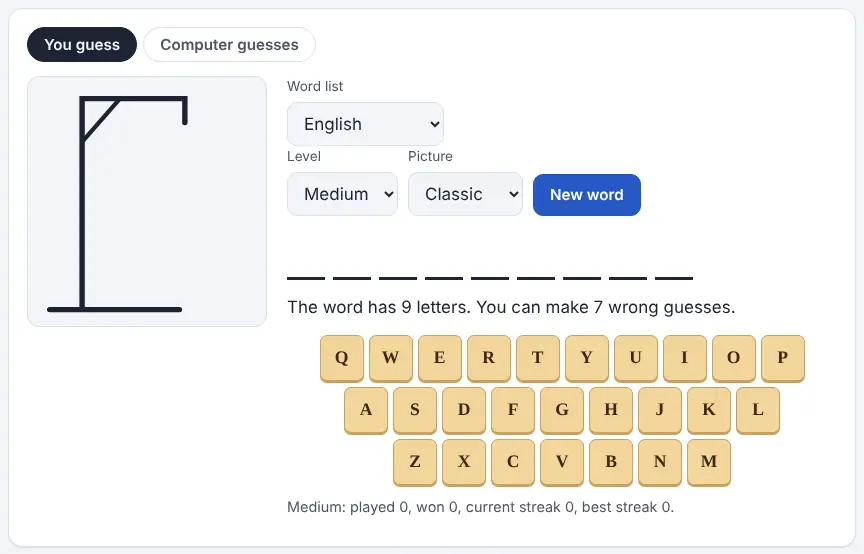
The game has two tabs. In “You guess”, the computer chooses a hidden word and shows one blank for each letter. You pick letters from the on-screen keyboard (or type them), and every correct letter drops into place. Each miss adds to a picture, and you lose if the picture is complete before the word is. There are three levels: Easy offers short, familiar words and eight misses, Medium has longer common words and seven, and Hard has longer, rarer words and only six.
In “Computer guesses”, the roles swap. You think of a word, tell the game how long it is (3 to 14 letters) and press Start. The computer then requests letters one by one, and you tap the squares where it appears, or say it isn’t there. Behind the scenes it narrows a full dictionary down to the words that still match, then asks for whichever letter is most common among them. The page never sees your word, and the computer will tell you if your answers don’t match anything it knows.
How to use it
- Open the game in a new tab and choose a tab: “You guess” or “Computer guesses”.
- Pick a word list language from the menu (English is the default) and a level: Easy, Medium or Hard.
- Choose the picture. Classic draws the familiar gallows; Balloons pops a balloon for every wrong letter instead.
- Press New word and start choosing letters, either by tapping the on-screen keys or by typing on a keyboard.
- To let the computer guess, choose the number of letters in your word and press Start. Mark each letter it asks about, then press Done; if the letter isn’t there, press “No”.
- At the end you can type your word in so the computer can check whether it knew it, or whether a letter was marked differently.
More tips
- Hold back the rare letters (J, Q, X, Z) until the shape of the word points to them, since every miss costs the same.
- Results are stored per level in your own browser, so a shared classroom computer shows one combined record.
Ideas for the classroom and home learning
- KS1 (5–7)Play “You guess” on Easy with the Balloons picture on the interactive whiteboard. Children suggest letters in turn and sound out the word as it builds, which reinforces letter–sound links without the gallows image.
- KS2 (7–11)Use “Computer guesses” with this week’s spelling words. Pupils must mark every letter accurately, so they have to spell the word correctly in their heads, and they quickly see that a slip confuses the computer.
- KS3 (11–14)Turn it into a maths and reasoning lesson: ask why the computer’s first guess is usually a vowel, then record which letters it chooses over several rounds and compare them with letter-frequency tables.
- KS4 (14–16)Try Hard mode in pairs as a vocabulary starter. After each round, use the look-up link and ask the pair to put the word in a sentence before the next game.
Learning a language? Take the challenge
Learning French, Spanish, Welsh or another language? Switch the word list to that language and play “You guess” on Easy. Spotting which letters and endings are most useful in another language is a quick way to tune your ear and eye. Accented letters are treated as their plain versions, so the keyboard stays simple.
Questions
Is the gallows picture suitable for young children?
If you would rather avoid it, choose the Balloons picture. The game works in exactly the same way, but a balloon pops with each wrong letter.
Could a pupil be given an unsuitable word?
The word site states that it leaves rude or offensive words out of its secret-word choices, so it is designed for a whole class to play together.
Can children play on tablets?
Yes. The letters can be tapped on screen, the layout fits phones and tablets, and the game keeps working offline once it has loaded.
Does it need an account?
No. There is no sign-up, and scores live only in the browser on the device being used.
Opens Unscramble Words 4U, our free word-puzzle site, in a new tab. Free, with no sign-up.
Safety: the classic picture is a gallows. For younger or sensitive groups, switch to the Balloons picture before you start.