

Crossword Generator
Press one button and get a brand-new crossword, ready to solve on screen or print for a class. You don’t type any words in: the clues are written by the word site’s own team and the grid is built for you.
Opens Unscramble Words 4U, our free word-puzzle site, in a new tab. Free, with no sign-up.
What it does
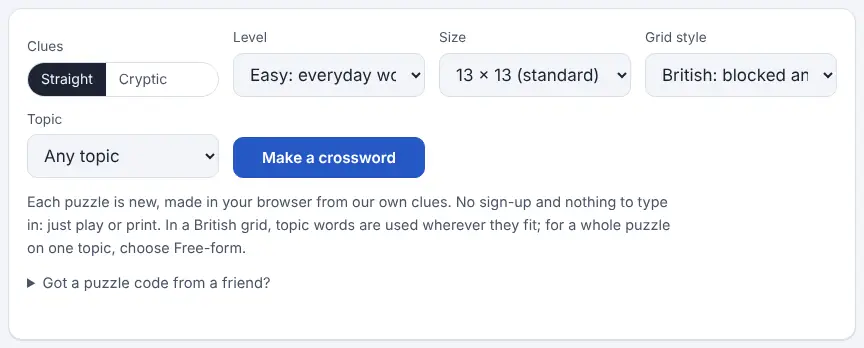
The generator creates a complete crossword each time you ask, using a bank of family-friendly clues written for the site. You choose the clue difficulty (Easy, Medium or Hard), the grid size (9 × 9, 11 × 11, 13 × 13 or 15 × 15) and the grid style. A British grid is the blocked, symmetrical kind familiar from UK newspapers. A free-form grid is an open criss-cross of words, and it is the one to pick when you want every answer linked to a single topic.
Topics include animals, birds, food, the body, colours, feelings, geography, history, maths, music, science, space, sport, transport, weather and more. Every puzzle carries a short code. Type that code in later, or share a link, and the exact same crossword is rebuilt, so a whole class can tackle an identical puzzle on paper or on screen. Answers use British spelling.
How to use it
- Open the generator in a new tab and make sure “Straight” is selected under Clues.
- Choose a level, a grid size and a grid style. If you want a themed puzzle, choose Free-form and then pick a topic.
- Press “Make a crossword” and your grid is ready at once; press it again for a different one.
- To solve on screen, select a square or a clue and start typing. Selecting the same square again (or pressing Space) switches between across and down.
- Use Check to mark mistakes, or Reveal to show one letter, one answer or everything. The timer can be hidden.
- Press Print for a clean copy. By default the answers print on a separate page; untick that option if you only want the puzzle.
More tips
- Keep the puzzle code (it is printed on both pages) so you can bring the crossword back for a second attempt or a different class.
- Progress is saved in the browser on that device, so pupils can close the page and finish later on the same machine.
Ideas for the classroom and home learning
- KS1 (5–7)Print an Easy 9 × 9 free-form puzzle on animals or colours and solve it together as a shared reading activity, with an adult reading the clues aloud.
- KS2 (7–11)Pick a free-form topic that matches your science or geography unit and use the printout as a revision homework. Keep the answer page for marking.
- KS3 (11–14)Give the class one puzzle code and race in pairs on screen, then discuss which clues were hardest and why.
- KS4 (14–16)Try a Hard 15 × 15 British grid as a vocabulary and lateral-thinking starter, then ask students to write two clues of their own in the same style.
Questions
Can I choose my own words and clues?
No. This tool builds puzzles from the site’s own clue bank. If you want a puzzle from your own word list, the word search maker accepts custom words.
Is it safe for young pupils?
Yes. Every clue and answer in the bank is family-friendly, and the Easy level sticks to everyday words with direct clues.
Will it print on A4?
Yes. The print layout suits both A4 and US Letter paper.
Why are there no American-style grids?
In American grids each letter belongs to two answers, one across and one down, which needs a much larger clue bank. The site offers British and free-form grids instead.
Opens Unscramble Words 4U, our free word-puzzle site, in a new tab. Free, with no sign-up.