

Word Search Solver
Stuck on the last two words in a word search? Type the letter grid and the list into this free solver and it marks exactly where each one is tucked away.
Opens Unscramble Words 4U, our free word-puzzle site, in a new tab. Free, with no sign-up.
What it does
The solver reads your grid row by row, then hunts for each word on your list in every possible direction: left to right, right to left, up, down and along both diagonals in either direction – eight in all. Every word it finds is colored in on the grid and checked off the list, and the tool tells you which square it starts from and which way it runs.
For teachers, it’s a fast way to check a word search before printing it, or to settle a ‘there’s no BANANA in here!’ argument. When a word can’t be found, the cause is usually a single typo, so it also helps students practice careful copying and proofreading.
How to use it
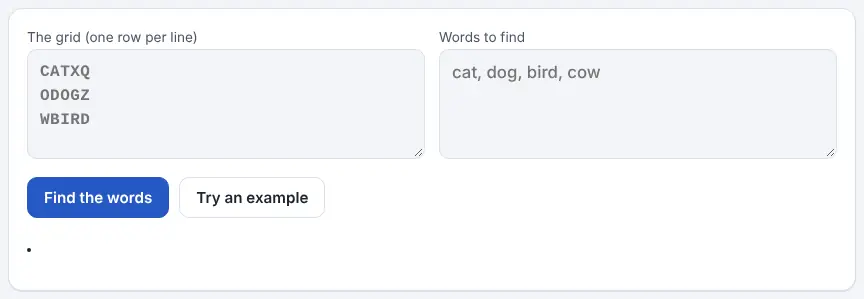
- In the grid box, type the puzzle one row per line, using only the letters. Spaces between letters are fine.
- In the second box, list the words to look for – putting each on its own line, or separating them with commas.
- Press Find the words, and any word that turns up is shaded on the grid and struck off your list, with a note of its starting square and direction.
- If a word is missing, compare its spelling and the nearby letters in the grid; one wrong letter can hide it.
- To see how it works first, press Try an example.
More tips
- When searching by hand, look for rare letters such as Q, X, Z or J first – they stand out in a grid.
- Tackle the longest words first. Once they’re found, the shorter ones have fewer places left to hide.
- Work along each row looking for a word’s first letter, then look at the eight neighboring squares for its second.
Ideas for the classroom and homeschool
- Grades K–2Make a small 6 × 6 grid of sight words. After children search, display the solved grid so everyone can trace the words with a finger.
- Grades 3–5Students design topic word searches (for example, the solar system or the water cycle) on graph paper, type them into the solver and fix any word that doesn’t show up.
- Grades 6–8Use it for a proofreading lesson: hand out a grid with deliberate copying errors and ask students to figure out why the solver can’t find certain words.
- TeachersBefore copying a worksheet for the class, run the grid through the solver to confirm every listed word really is hidden.
Questions
Will it find words written backward or diagonally?
Yes. It checks all eight directions, so reversed and diagonal words are included.
Can it read a picture of the puzzle?
Not at the moment – the grid needs to be typed in, one row per line.
Can I make a word search to go with it?
Yes. The word search maker on the same site builds a printable grid with an answer key, which you can then check here.
Is it fair to use in class?
Used after students have had a real try, it’s a handy checking tool rather than a shortcut. Try showing only one found word at a time on the board as a hint for groups who are stuck.
Opens Unscramble Words 4U, our free word-puzzle site, in a new tab. Free, with no sign-up.