

Word Search Maker
Drop in this week’s spelling or vocabulary words and get a printable word search with an answer key in just a few clicks. It’s a fast way to turn any word list into a quiet, focused activity.
Opens Unscramble Words 4U, our free word-puzzle site, in a new tab. Free, with no sign-up.
What it does
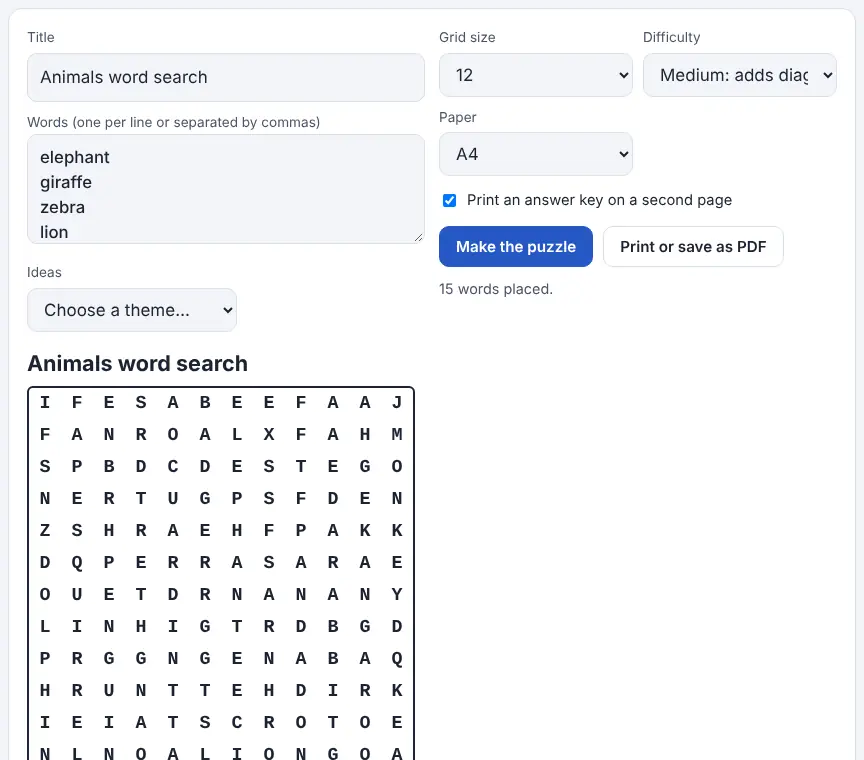
You provide the words, and the tool hides them among random letters. Type your own list, or begin with a built-in theme such as animals, fruits and vegetables, weather, space, sports, colors, the kitchen, school, countries or Christmas and then edit it. (The built-in lists use British spellings, so you may want to change “Colours” to “Colors”.) Add a title, pick a grid from 8 × 8 to 20 × 20, and choose a difficulty.
Difficulty decides which directions words can run. Easy keeps to left-to-right and top-to-bottom; Medium allows diagonal words; Hard lets words run backwards as well. If a word won’t fit, the tool lets you know so you can enlarge the grid or shorten the list. Printing outputs only the puzzle, on US Letter or A4, with an optional second page showing every hidden word highlighted.
How to use it
- Open the maker in a new tab and type a name for the puzzle in the Title box.
- Enter your words, each on its own line or with commas between them. Need ideas? Pick something from the Ideas menu, then edit the words.
- Select a grid size (8 to 20 squares across) and a difficulty: Easy, Medium or Hard.
- Click “Make the puzzle”. Click again any time for a fresh layout of the same words.
- Choose US Letter, keep the answer key option checked if you want one, and click the print button.
- In the print dialog, pick a printer or set the destination to PDF to keep a digital copy for Google Classroom or email.
More tips
- Anything that isn’t a letter, including spaces and digits, is dropped, so “solar system” is hidden as a single run of letters.
- If a word keeps getting dropped, it’s likely longer than the grid. Go up a size or swap in a shorter word.
Ideas for the classroom and homeschool
- Grades K–2Build an Easy 8 × 8 puzzle from sight words or a word family (cat, hat, mat). Students read each word aloud as they circle it.
- Grades 3–5Make the weekly spelling list into a Medium puzzle for morning work or homework, and use the answer key for quick checking.
- Grades 6–8Use content-area vocabulary, such as science or social studies terms, and give definitions instead of the word list so students identify each term before searching.
- Grades 9–12Have students design a Hard puzzle from test-review terms and trade with a partner; typing the list forces careful spelling.
Questions
Is it really free?
Yes. There’s no charge and no limit on how many puzzles you create or print.
Can I save it as a PDF?
Yes. Click the print button and set the destination in your browser’s print dialog to PDF.
What happens if a word doesn’t fit?
The tool leaves it out and tells you. A larger grid or a shorter list usually fixes it.
Can I use it outside school?
Of course. It works for birthday parties, baby showers, holidays or any themed list.
Opens Unscramble Words 4U, our free word-puzzle site, in a new tab. Free, with no sign-up.