

Codes and Ciphers
One starting point for every secret-message, number-code and ancient-alphabet tool on Unscramble Words 4U, grouped so you can find the right one quickly.
Opens Unscramble Words 4U, our free word-puzzle site, in a new tab. Free, with no sign-up.
What it does
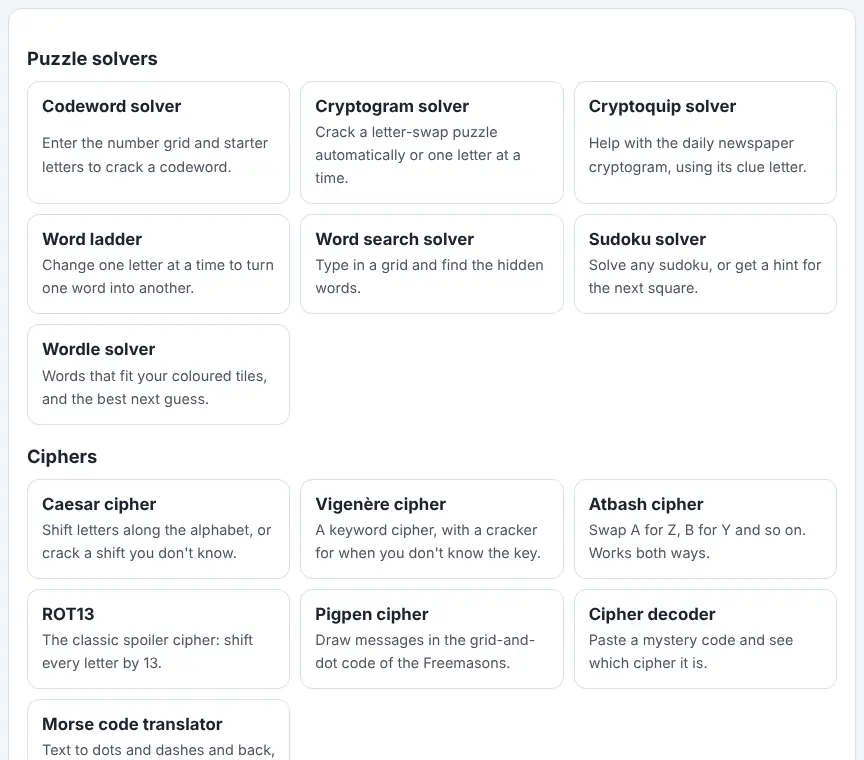
This hub page gathers the code tools into tidy groups: puzzle solvers (codewords, cryptograms, word ladders and similar), classic ciphers such as Caesar, Vigenère, Atbash, ROT13 and pigpen, computer codes like binary, hexadecimal, Base64 and the ASCII table, and old scripts and spelling systems including runes, ogham, braille and the phonetic alphabet. There is also a cipher decoder for messages when nobody knows how they were made, plus a few make-your-own tools such as a word search maker.
Each card gives a one-line summary and links to its tool. Everything works inside the browser, so what a child types stays on their own device. That makes the collection handy for homework clubs, escape-room lessons, treasure trails and themed days where you want several activities ready in one place.
How to use it
- Open the hub and skim the group headings to decide whether you need a cipher, a computer code, an old alphabet or a puzzle solver.
- Read the short line on each card to check it does what you want, then select it to open that tool.
- Holding a puzzling message with no clue to its method? The cipher decoder card is the place to begin.
- Use the linked guide to types of ciphers if you or your class want background before trying the tools.
- Come back to the hub to move between tools during a lesson rather than searching each time.
More tips
- Explain the difference early: a code swaps whole symbols from a fixed list, while a cipher applies a rule or a key to the letters.
- Bookmark the hub on classroom devices so students can find tools without typing long addresses.
Ideas for the classroom and homeschool
- Grades K–2Use letters-to-numbers and the pigpen tool for a simple treasure hunt where each clue is a short word in code.
- Grades 3–5Run a 'spy school' afternoon: Caesar shifts, Atbash and the phonetic alphabet, with partners sending each other short coded notes.
- Grades 6–8In a computer science class, compare binary, hex and Base64 versions of the same word and discuss why computers need more than one way to write data.
- Grades 9–12In history or computer science, debate why simple ciphers fail against frequency analysis and what that tells us about modern encryption.
Questions
Is a code the same as a cipher?
Not quite. A code replaces letters or words using a fixed table, such as Morse dots and dashes. A cipher transforms each letter with a rule or a key, like shifting it three places.
Do learners need an account?
No. The tools are free and need no sign-up, which suits school devices.
Can these tools break real encryption?
No. They handle historical ciphers, puzzles and simple encodings. The encryption used for banking or messaging apps is a different thing entirely.
Which tool is best for a first lesson?
The Caesar cipher is a good start because the rule is easy to see and the class can quickly try every possible shift.
Opens Unscramble Words 4U, our free word-puzzle site, in a new tab. Free, with no sign-up.
Ciphers here are for fun and learning, not real security. Wordle belongs to The New York Times Company and Cryptoquip to its puzzle publisher; Classfern and Unscramble Words 4U are not affiliated with or endorsed by either.