

Hangman
A free take on the classic letter-guessing game that runs in both directions: students can try to uncover the computer’s secret word, or keep a word in mind and see how fast the computer figures it out.
Opens Unscramble Words 4U, our free word-puzzle site, in a new tab. Free, with no sign-up.
What it does
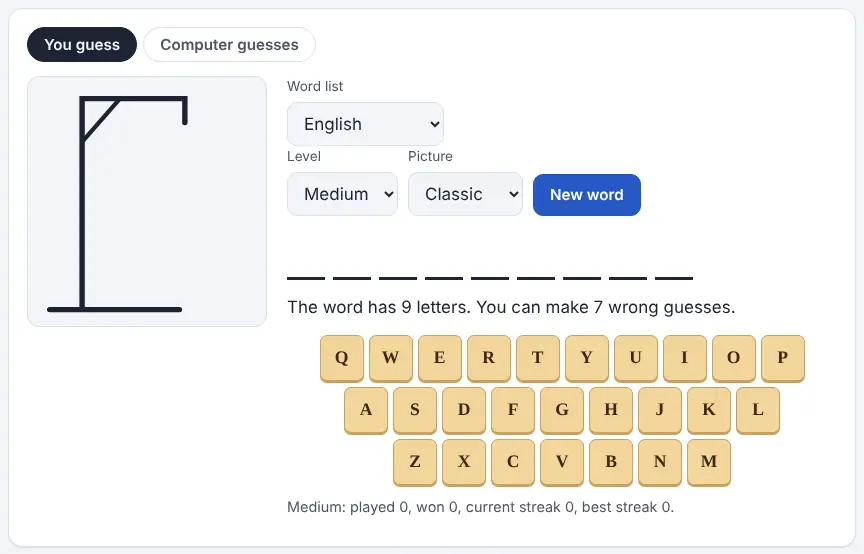
There are two tabs. In “You guess”, the computer secretly chooses a word and shows a blank for every letter. Players choose letters from the on-screen keyboard or type them, and correct letters fill in wherever they belong. Each miss adds to a drawing, and the computer wins if the drawing is finished first. Easy uses short, familiar words with eight misses allowed; Medium gives you seven for longer everyday words; Hard allows just six and picks longer, less common words.
In “Computer guesses”, the roles flip. You think of a word, enter its length (anywhere from 3 to 14 letters) and press Start. The computer requests a letter, and you tap each square where it belongs or tell it the letter isn’t there. It begins with its whole dictionary of words that long, throws out any that no longer fit, and always picks the letter shared by the largest number of remaining candidates. It never sees your word, and it will speak up if your answers don’t match any word it knows.
How to use it
- Open the game in a new tab and pick “You guess” or “Computer guesses”.
- Choose a word list language (English is selected by default) and a level: Easy, Medium or Hard.
- Pick a picture: Classic shows the traditional gallows, while Balloons pops one balloon per wrong letter.
- Press New word, then choose letters by tapping the keys on screen or typing them.
- For “Computer guesses”, select how many letters your word has and press Start. Tap every square where the requested letter appears, then press Done; if it isn’t in the word, press “No”.
- When the round ends, type in your word so the computer can tell you whether it knew it or whether a letter was marked differently.
More tips
- Save rare letters (J, Q, X, Z) until the word’s shape points to them; a miss uses up a turn whichever letter you picked.
- Wins, losses and streaks are saved per level in the browser on that device, so a shared classroom computer keeps one combined record.
Ideas for the classroom and homeschool
- Grades K–2Project “You guess” on Easy with the Balloons picture. Students take turns calling out letters and blend the sounds together as the word appears, practicing phonics in a low-pressure way.
- Grades 3–5Run “Computer guesses” using the week’s spelling list. To answer correctly, students must hold the exact spelling in their heads, and a mistake shows up right away when the computer gets confused.
- Grades 6–8Make it a probability discussion: why does the computer usually start with a vowel? Have students log its first five guesses across several games and compare them with a letter-frequency chart.
- Grades 9–12Use Hard mode in pairs as a vocabulary warm-up. After each round, look up the word with the link provided and have the pair write a sentence using it.
Learning a language? Take the challenge
Studying Spanish, French, German or another language? Switch the word list to that language and play “You guess” on Easy. Noticing which letters and word endings pay off in a new language is a fast way to build familiarity. Accented letters count as their plain versions, so the keyboard stays simple.
Questions
Is the gallows image appropriate for young kids?
If you’d prefer to skip it, choose the Balloons picture. Gameplay is identical, but a balloon pops with each wrong letter.
Could students get an inappropriate word?
The word site states that it leaves rude or offensive words out of its secret-word choices, so it is designed for whole-class play.
Does it work on Chromebooks and tablets?
It runs in the browser, letters can be tapped on screen, and once loaded it keeps working offline.
Do students need to log in?
No. There is no sign-up, and scores stay in the browser on the device being used.
Opens Unscramble Words 4U, our free word-puzzle site, in a new tab. Free, with no sign-up.
Safety: the classic picture shows a gallows. For younger or sensitive groups, switch to the Balloons picture first.