

Crossword Generator
Click once and get a fresh crossword to solve on screen or print for your class. There’s nothing to type in: the clues come from the word site’s own hand-written collection, and the grid is built automatically.
Opens Unscramble Words 4U, our free word-puzzle site, in a new tab. Free, with no sign-up.
What it does
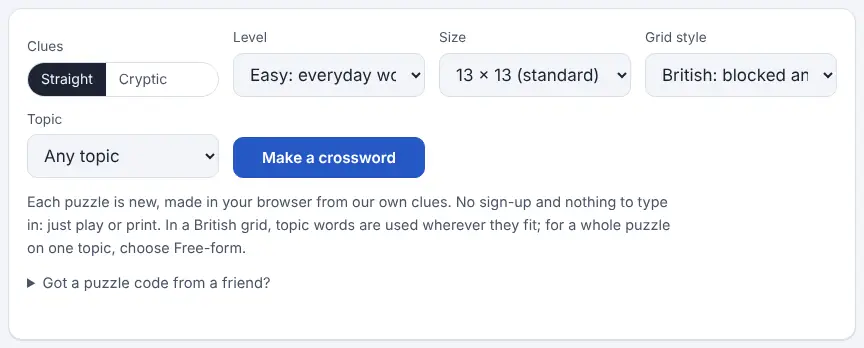
Each time you ask, the generator assembles a complete crossword from a bank of family-friendly clues written for the site. You set the clue difficulty (Easy, Medium or Hard), the grid size (from a quick 9 × 9 up to a large 15 × 15) and the grid style. The British style is a symmetrical grid with black squares, as seen in UK newspapers. The free-form style is an open criss-cross of words, and it’s the best pick when you want every answer to come from one topic.
Topics cover areas such as animals, birds, food, the human body, feelings, geography, history, math, music, science, space, sports, transportation and weather. Every puzzle gets a short code; entering it later or sharing the link rebuilds the identical crossword, so a whole class can work on the same puzzle. Note that answers use British spelling, so expect forms like “colour”.
How to use it
- Open the generator in a new tab and check that “Straight” is selected under Clues.
- Pick a level, a size and a grid style. For a themed puzzle, choose Free-form and then select a topic.
- Click “Make a crossword” and your grid is ready instantly; clicking again gives you a different one.
- To play on screen, click a square or a clue and type. Clicking the same square again (or pressing the space bar) toggles between across and down.
- Use Check to flag errors, or Reveal for one letter, one word or everything. You can hide the timer.
- Click Print for a clean copy. The answer key prints on its own page unless you untick that box.
More tips
- Write down the puzzle code (it appears on both printed pages) so you can reuse the same crossword with another class period.
- Progress saves in the browser, so students can come back and finish on the same device.
Ideas for the classroom and homeschool
- Grades K–2Print an Easy 9 × 9 free-form puzzle about animals and solve it as a class, with the teacher reading each clue aloud and students sounding out the answers.
- Grades 3–5Match a free-form topic to your science or social studies unit and send the printout home as review. Keep the answer key for grading.
- Grades 6–8Share one puzzle code and have partners race on Chromebooks, then talk through the toughest clues together.
- Grades 9–12Use a Hard 15 × 15 grid as a bell-ringer, then challenge students to write two original clues for words from your current unit.
Questions
Can I enter my own vocabulary words?
Not in this tool, which uses the site’s own clue bank. For a puzzle from your own word list, try the word search maker instead.
Is the content kid-friendly?
Yes. Every clue and answer is family-friendly, and the Easy level sticks to everyday words with straightforward clues.
Does it print on US Letter paper?
Yes. The printout is laid out to fit US Letter as well as A4.
Why can’t I get a typical American-style grid?
In American grids each letter belongs to two answers, one across and one down, which needs a far bigger clue bank. The site offers British-style and free-form grids instead.
Opens Unscramble Words 4U, our free word-puzzle site, in a new tab. Free, with no sign-up.