

Morse Code Practice
A free trainer that scores every attempt at sending or receiving Morse, so learners can watch themselves improve a few minutes at a time.
Opens Unscramble Words 4U, our free word-puzzle site, in a new tab. Free, with no sign-up.
What it does
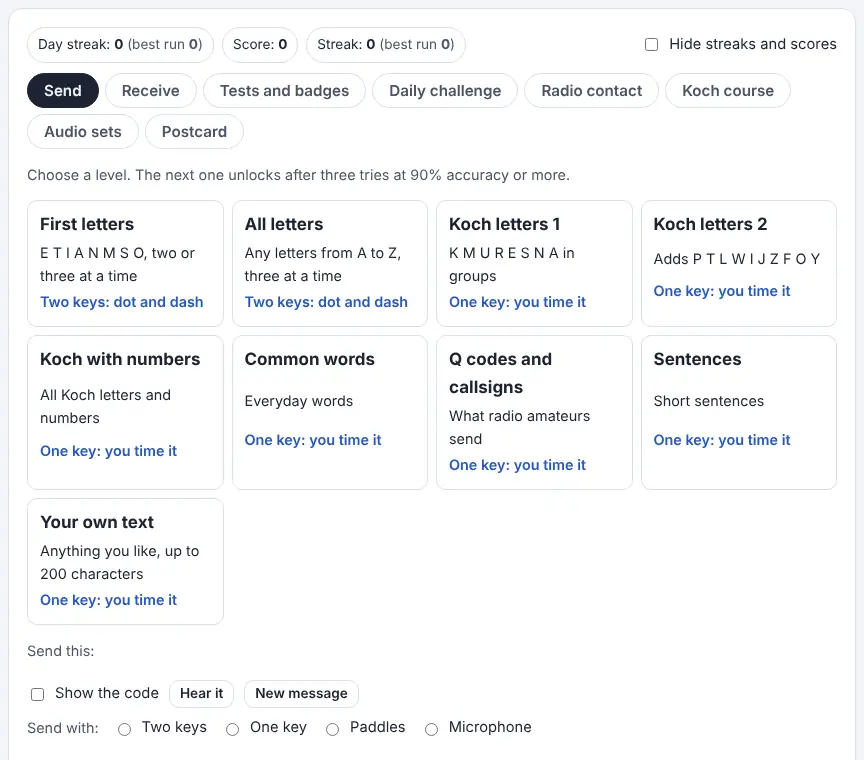
The Morse Code Practice page on Unscramble Words 4U is a complete trainer. On the Send tab it shows a target, you key it, and each letter turns green or red, with your code displayed next to the correct one. On the Receive tab it plays Morse and you type what you hear, replaying as many times as you like. Every try earns a score for accuracy, another for fluency (how steady your rhythm is), and a speed in words per minute, which add up to one to three stars.
The levels range from a handful of short letters through Koch letter groups, common words, radio Q codes and call signs to full sentences, and each opens after three tries of 90% or higher on the previous level. You can also practice your own text. On top of that there are six sending tests (Beginner and Novice, then Bronze, Silver and Gold, and finally ‘Code Like a Pro’) that unlock downloadable badges, a daily challenge shared by every user, a pretend radio contact with an invented operator, a step-by-step Koch listening course, downloadable audio sets with answer keys, and Morse postcards to send a friend. Beginners can use two keys (one for dots, one for dashes); later levels use a single key you time yourself, iambic paddles, or a real buzzer or key through the microphone.
How to use it
- Open the trainer and choose Send or Receive.
- Pick a level. Start with the first one – the others unlock as you score well.
- On Send, choose how to key: Two keys, One key, Paddles or Microphone. Key the target, then press Check to see green and red letters and your scores.
- On Receive, press Play, type what you hear and press Check.
- When you’re ready, open Tests and badges, pass a five-message test, and download your badge, which shows your scores and when you passed. If you add a name, keep it to a first name or a nickname.
- Try the other tabs, from the Koch course and Daily challenge to Radio contact, Postcard and Audio sets. Speed, Farnsworth spacing, tone and volume are under the sound and light settings.
More tips
- Say ‘dit’ and ‘dah’ in your head to learn letters by sound instead of counting dots.
- Some students find scores stressful. A checkbox hides streaks and scores completely.
- Use Audio sets to make a WAV practice track and answer key for screen-free listening homework.
Ideas for the classroom and homeschool
- Grades 3–5Morse club: students work through the first two levels in pairs, one keying and one checking. Celebrate the first Beginner badge on a bulletin board.
- Grades 6–8Learning science: track accuracy and fluency over two weeks on the built-in progress chart, then discuss what the data shows about short, spaced practice.
- Grades 6–8Communication: try the practice radio contact and explore why ham operators use short codes like CQ and 73 to save time.
- Grades 9–12Physics and engineering: compare the Koch method (one new character at a time at a fast letter speed) with Farnsworth timing (extra space between letters), and design a fair test of which helps the class more.
Questions
Is it safe for kids?
The source page says it has no accounts, chat, rooms, leaderboards or comments, so nobody can contact a child through it. The radio contact is a scripted pretend operator, and postcards only reach people you choose to share a link with.
Where are scores saved?
In the browser’s local storage on that device, not on a server. On a shared school computer, students can erase them with the Clear my scores button.
Are the badges real certifications?
No – each one is a light-hearted self-check made in the browser. A separate badge checker page can confirm that a badge’s details haven’t been altered, but not who earned it.
Does the microphone option record anything?
The tool says microphone sound is analyzed live in the browser and never recorded.
Opens Unscramble Words 4U, our free word-puzzle site, in a new tab. Free, with no sign-up.
The light and flash modes can affect people with photosensitive epilepsy; the tool keeps them slow, but check before use. Badges are for fun, not proof of skill.