

Morse Code Decoder
Tap dots and dashes on an on-screen key and watch them become letters as you go. The same tool can also listen for beeps through a microphone or read an audio file.
Opens Unscramble Words 4U, our free word-puzzle site, in a new tab. Free, with no sign-up.
What it does
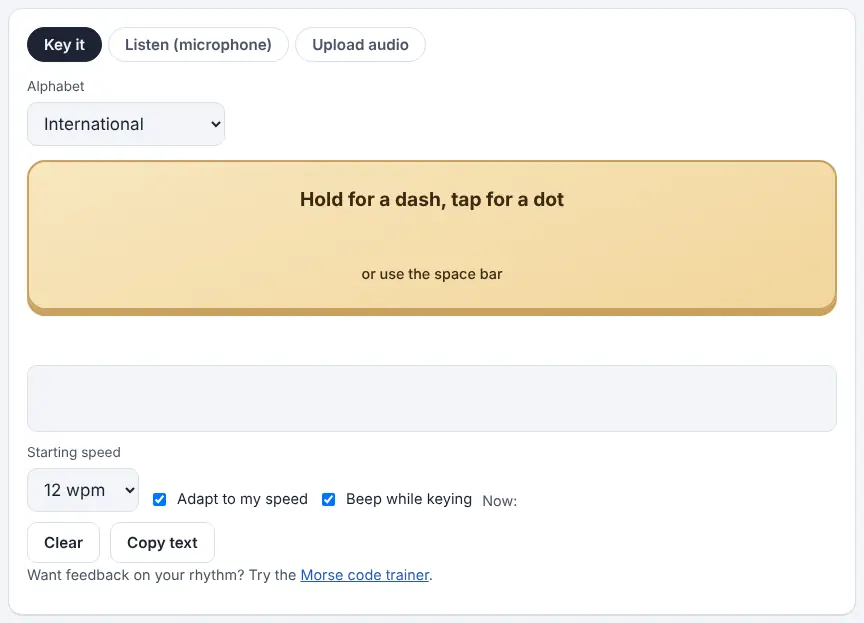
The Morse Code Decoder on Unscramble Words 4U has three tabs. Key it gives you a big button: a quick tap makes a dot, a longer hold makes a dash, and on a computer the space bar works too. As you send, it displays the pattern of the current letter, and when you pause it locks in a letter. Listen uses the microphone to pick up Morse played nearby – from a buzzer, a radio, a phone or a video – and decodes it in real time. Upload audio opens a recording from your device and shows the text with timestamps, so you can click a word to replay that part.
Because it measures the actual beeps and gaps, the decoder figures out the speed on its own and handles slow or slightly uneven sending. You can pick a starting speed, let it adapt to you, and turn on a beep while you key. It also reads the Greek, Russian, Hebrew, Arabic, Persian, Korean SKATS and Japanese Wabun Morse systems if you select one first. It is a great fit for students who want instant feedback on whether their sending can be read.
How to use it
- Open the decoder and pick a tab: Key it, Listen (microphone) or Upload audio.
- If you are not using English letters, select the right system from the Alphabet menu before starting.
- Key it: tap the big key briefly for a dot and hold it for a dash. Pause for about three dots’ worth to end a letter, and longer to end a word.
- Listen: press Start listening and allow microphone access when the browser asks. Play the Morse close to the mic. Let it find the tone and speed automatically or set them yourself, and adjust the sensitivity.
- Upload audio: choose a file (such as MP3, WAV, OGG, M4A or WebM) or drag it onto the box, or press Try a sample to see it in action.
- Copy the decoded text, or in the Listen and Upload tabs download it as a .txt file.
More tips
- Check ‘Beep while keying’ so students hear their own rhythm – it makes the link between sound and symbol much clearer.
- In listening mode, a quiet room and one clear tone work best. Talking over the beeps throws it off.
Ideas for the classroom and homeschool
- Grades K–2Teach E (one dot) and T (one dash), then let kids take turns keying them on the interactive whiteboard to see the letter appear.
- Grades 3–5Keying relay: each pair sends a short word on the decoder while the class writes down their guess, then checks the screen.
- Grades 6–8Science of sound: one student plays Morse from the translator on a second device while the decoder listens. Change distance, volume and background noise and record when decoding breaks down.
- Grades 9–12Computer science: discuss how software could tell a dot from a dash when people’s timing varies, and why measuring relative lengths works better than fixed timings.
Questions
Does the microphone record students’ voices?
According to the tool, the microphone only turns on after you press Start and grant permission, and the sound is analyzed in the browser as it arrives – it is not recorded, stored or uploaded. Uploaded files are also opened on the device.
How long is a dash compared with a dot?
Roughly three times longer. Allow about three dot-lengths of silence after a letter and around seven after a word.
What kinds of files can it read?
Common formats such as MP3, WAV, OGG, M4A and WebM open in most browsers. The tool accepts recordings up to roughly 30 minutes or 100 MB.
Is this the same as the audio decoder page?
The audio decoder focuses on recordings and the microphone, with extra advice for ham radio users. This page adds the tappable key, so it is the better pick for learning to send.
Opens Unscramble Words 4U, our free word-puzzle site, in a new tab. Free, with no sign-up.
Using the microphone requires browser permission, so check your district’s device policy first. Morse is easy for anyone to read, so it is not a safe way to hide personal information.