

Morse Code Audio Decoder
Got a sound clip full of beeps? This free tool listens to it and writes out the message, showing the dots, dashes, speed and pitch along the way.
Opens Unscramble Words 4U, our free word-puzzle site, in a new tab. Free, with no sign-up.
What it does
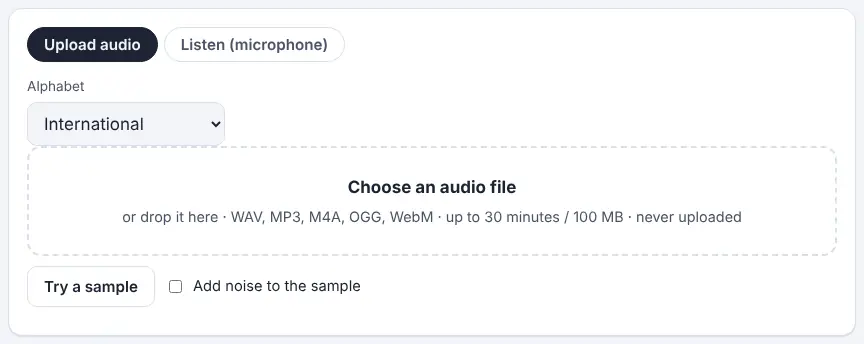
The Morse Code Audio Decoder on Unscramble Words 4U has two tabs. Upload audio reads a recording you choose from your device; Listen (microphone) decodes Morse that is being played near your computer or phone in real time. For files, it searches for the strongest beeping tone, measures each beep and silence, and produces the decoded text with times beside it. You also see a spectrogram, a waveform and a timing strip, plus an estimate of the sending speed (wpm) and the pitch in hertz.
If the result looks off, you can change the sensitivity, type in the tone yourself or pick a speed, and it decodes the file afresh straight away. Clicking a word or the waveform plays that part of the recording. There is a built-in sample, with an option to add noise, so you can try it without a file of your own. Radio amateurs (who call Morse ‘CW’) can use it on receiver audio, and puzzle fans can crack sound-file clues. In the classroom it turns an abstract code into something pupils can see as well as hear.
How to use it
- Open the tool and choose Upload audio or Listen (microphone).
- Pick an Alphabet if the message is not in International Morse.
- To decode a file, choose it or drag it onto the box. Formats such as MP3, WAV, OGG, M4A and WebM usually work, up to about 30 minutes or 100 MB. Press Try a sample if you just want to explore.
- Read the text and the dots and dashes. Leave ‘Find the tone for me’ ticked, or switch it off and set the tone slider by hand. Adjust Sensitivity and Speed if letters look wrong.
- To listen live, press Start listening, give microphone permission, then play your Morse close by. ‘Lock on this tone’ helps if the pitch keeps being lost.
- Copy the text or download it as a .txt file.
More tips
- Phone recorder apps often have noise reduction or voice enhancement – switch it off, because it can swallow the gaps.
- A # in the text means a pattern did not match the chosen alphabet. Check those codes by hand on the alphabet chart – a nice extension task in itself.
Ideas for the classroom and home learning
- KS2 (7–11)Mystery message: make a WAV file of a clue with the translator, play it to the class, let pupils try to decode it by ear, then reveal the answer with the decoder.
- KS3 (11–14)Sound and waves: use the spectrogram and waveform to show that each beep is a steady frequency switched on and off. Compare a high and a low tone.
- KS4 (14–16)Physics or computing: add noise to the sample and investigate how the decoder copes. Discuss signal-to-noise ratio and why narrow filters help pick out one tone.
- KS4 (14–16)Evaluating technology: read the tool’s stated limits (speech, music and very weak signals can cause errors) and debate where automated decoding can and cannot be trusted.
Questions
Is my recording sent anywhere?
No, according to the tool. Files are opened and analysed by your own browser on your device, and microphone sound is processed as it arrives without being stored or uploaded.
Why are some letters wrong?
Background noise, other tones, uneven hand sending or very faint beeps can all confuse it, just as they would a person listening. Try changing the sensitivity or setting the tone manually.
Can it decode Morse from a radio?
Yes. Either hold the radio’s speaker near the microphone or save its audio as a file. It handles tones between 300 and 1,500 Hz, with speeds from around 5 wpm up to about 40 wpm.
How is this different from the translator?
The translator works with typed text and typed dots and dashes. This tool works with sound.
Opens Unscramble Words 4U, our free word-puzzle site, in a new tab. Free, with no sign-up.
Microphone access needs permission in the browser, so follow your school’s device policy. Only decode recordings you have the right to use.