

ASCII Table
ASCII gives each unaccented English letter, each digit and punctuation mark, plus a set of control signals, a code between 0 and 127. This searchable table shows them all.
Opens Unscramble Words 4U, our free word-puzzle site, in a new tab. Free, with no sign-up.
What it does
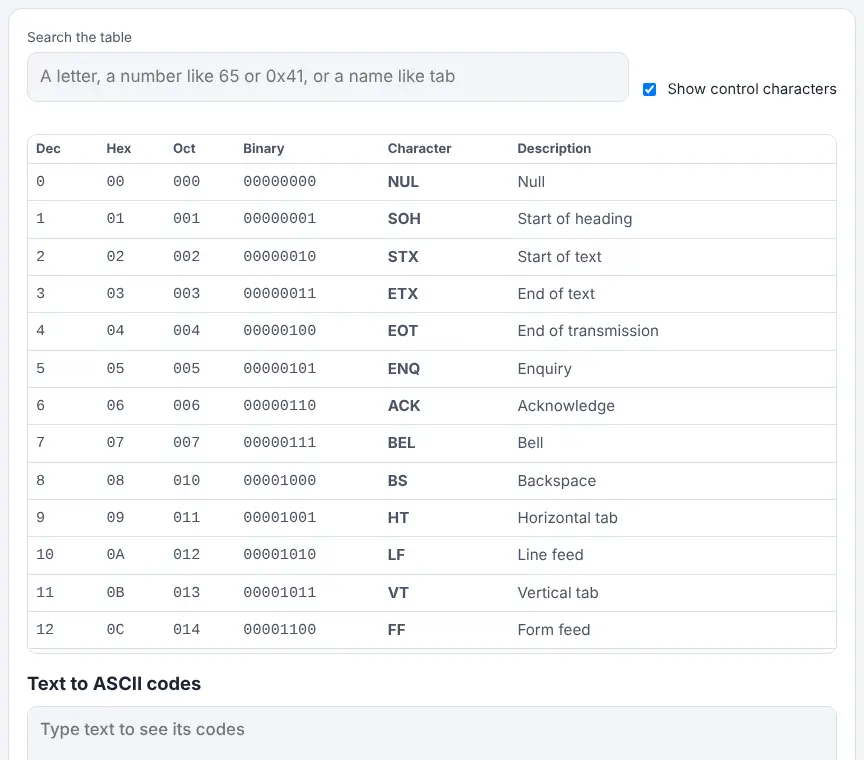
Each row lists a code in decimal, hexadecimal, octal and binary, next to the character and a short description. A search box at the top accepts a character (such as A), a number in decimal or hex (65 or 0x41), or a name (tab, bell) and narrows the table to match. A tick box, on by default, includes the control characters; untick it to see only the printable ones.
Below the table, a converter shows the code for each character you type. Anything outside ASCII, such as é or an emoji, is shown in square brackets as its UTF-8 bytes, which neatly shows where ASCII ends and modern Unicode takes over. ASCII dates from 1963 and was designed so different machines could share text. It is still a staple of computing lessons because it is small enough to explore in a single sitting, yet it underpins the text on almost every device.
How to use it
- Type a letter, a code or a name into the search box to filter the table.
- Untick the control-characters option if you only want printable characters.
- Read across a row for the decimal, hex, octal and binary forms.
- Scroll down and type text into the converter to see its codes character by character.
More tips
- The digits 0 to 9 are codes 48 to 57, so the character '7' is not the same as the number 7, a common source of confusion.
- The first 32 codes, plus 127, are control characters that once steered printers and terminals; for example 9 is tab and 10 starts a new line.
- Put the converter on the board and type a learner's name; the class reads out the codes and spots the capital-letter pattern.
Ideas for the classroom and home learning
- KS2 (7–11)Upper KS2: find the codes for each letter of a name and order the class names by their first code.
- KS3 (11–14)Use the table with the binary translator to decode a message by hand, then check with the converter.
- KS3 (11–14)Investigate why sorting can put 'Zebra' before 'apple' when a computer compares codes.
- KS4 (14–16)Compare ASCII with Unicode and UTF-8, using the converter to see how many bytes non-ASCII characters need.
Questions
What code is capital A?
65 in decimal, 41 in hex. Small a is 97, or 61 in hex.
What code is the space?
32 in decimal, which is 20 in hex.
What is extended ASCII?
Older systems used codes 128 to 255 for extra symbols and accents, but each did it differently. Today UTF-8 is used instead.
Is ASCII still used?
Yes, in effect. Unicode's first 128 codes match ASCII exactly, so plain English text stored as UTF-8 is byte-for-byte the same as ASCII.
Opens Unscramble Words 4U, our free word-puzzle site, in a new tab. Free, with no sign-up.