

Teacher mark book
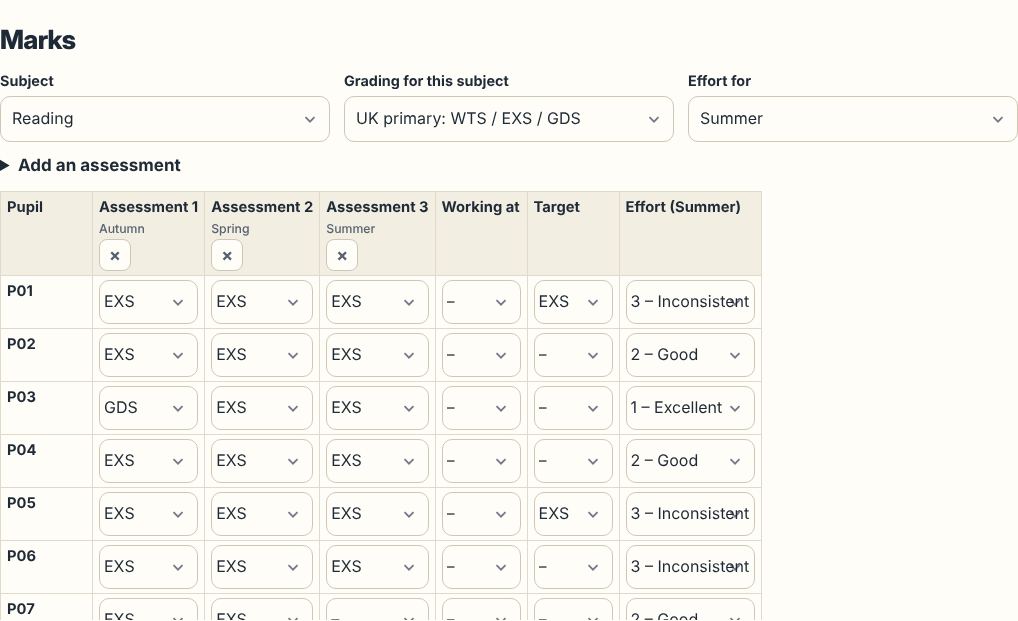
A mark book that understands UK assessment: raw marks and percentages, WTS / EXS / GDS, GCSE 9–1 working-at and target grades, effort 1–4 and attendance, with a whole-year view and reports at the end.
Write every report from your marks with Classfern Pro. What's in Pro Join the waiting list
What you can record
- Assessments with a name, date, term, type and mark scheme.
- Marks out of any total, or levels in the scheme you choose: UK primary, GCSE 9–1, EYFS, effort, or your own scale.
- Working-at and target grades for each pupil and subject.
- Effort each term, attendance and curriculum statements achieved from our Teacher Information Packs.
See progress without a spreadsheet
Term-by-term levels, progress since the start of the year and small trend charts are worked out for you. The pupil progress tracker suggests who might need a check-in.
Kept on your device
The mark book lives in your browser only, with encrypted backups you control and a plain CSV export when you need a spreadsheet. Use numbers or first names for pupils.
Reports from your marks
When reports are due, the School Report Writer turns the mark book into each pupil's year statistics and subject comments. Try the free demo.
Questions teachers ask
Can I import marks from a spreadsheet?
You can paste a pupil list to set up a class. Marks are entered in the grid; a CSV export is available for your own records.
Does it work for GCSE classes?
Yes. Choose GCSE 9–1 for working-at and target grades; the tool flags pupils working below target.