

Pupil progress tracker
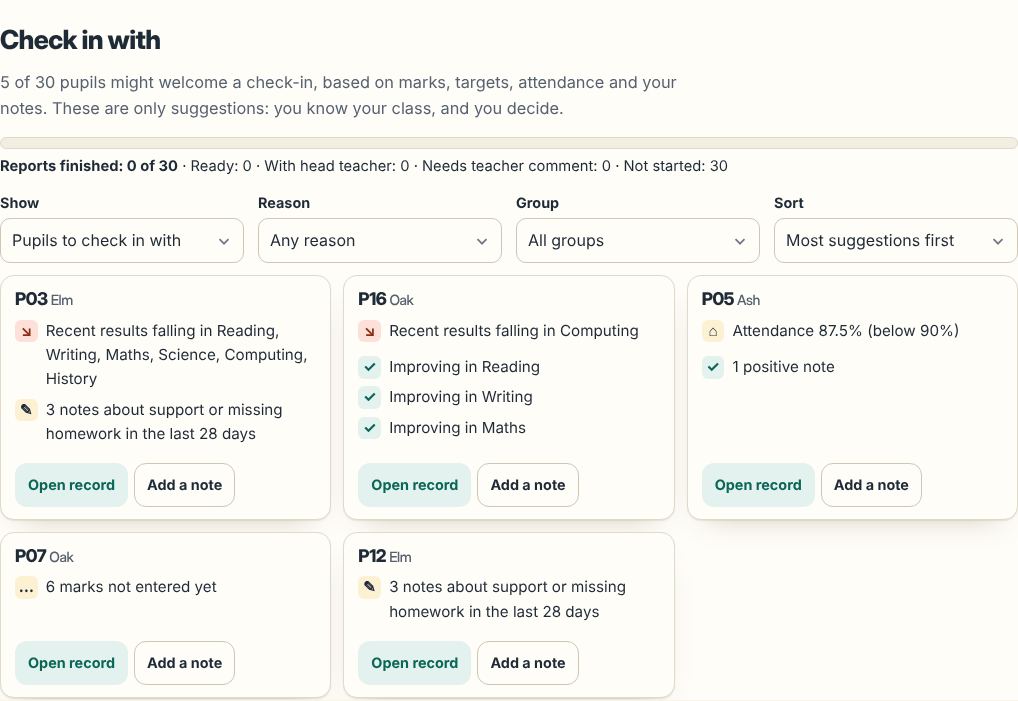
See at a glance which pupils might need a check-in, and why: below target, results slipping, attendance dipping or a run of "needs support" notes. Then use the same data to write their reports.
Write every report from your marks with Classfern Pro. What's in Pro Join the waiting list
What the tracker watches
A pupil is suggested only when there is a clear signal, and those with the most signals come first:
- Below target by a clear margin in the latest assessment (you set targets in the mark book).
- Results dropping and staying lower across the last two assessments.
- Attendance below the level you choose (90% by default).
- Notes: three or more "needs support" or "homework missing" notes in the last four weeks.
- Missing marks: two or more for assessments that have already happened.
Every reason is written out in words, with an icon, so nothing depends on colour. These are suggestions only: you know your class, and you decide who to check in with.
A whole-year view for every pupil
Open any pupil to see a chart of their results across the year in every subject, term-by-term levels, targets, effort and your notes, on one screen. The class summary shows averages per term, how many pupils are below target and where marks are missing.
Built for pupils' data
Everything is stored in your own browser on your device. Use numbers or first names; nothing about your pupils is sent to us. How it keeps data safe.
From tracking to reports
At the end of the year, the same marks, targets and notes fill in each report's statistics and subject comments in the School Report Writer. Record marks in the mark book. Try the free demo.
Questions teachers ask
Is the pupil progress tracker free?
You can try it in the free demo with made-up pupils. Tracking your own classes is part of Classfern Pro.
Does it label pupils?
No. It only suggests who you might check in with, and shows the reasons. The teacher always decides.